


NOL Card Balance Check: The Complete 2026 Guide for Dubai Commuters
If you use the Dubai Metro, bus, tram, or water bus, keeping an eye on your card credit is not optional. A NOL card balance check takes seconds, but skipping it can mean a rejected gate, a missed train, or a long queue at a top-up machine during rush hour. This guide covers every official way to check NOL card balance in 2026, from the RTA website and the NOL Pay app to SMS, station kiosks, and retail counters, along with the details competitors leave out: exact minimum balances, what pending credit actually means, how long a top-up takes to activate, and what to do if your check fails.
Everything here reflects how the Roads and Transport Authority (RTA) currently runs its NOL card balance check services in Dubai, UAE.
What Is a NOL Card and Why Balance Matters
The NOL card is a rechargeable smart card issued by Dubai’s Roads and Transport Authority. NOL is Arabic for “fare,” and the card works as a prepaid e-purse that you tap at metro gates, bus validators, tram stops, and water bus counters. Beyond public transport, it also covers RTA parking meters and payments at thousands of partner retail outlets, cafes, and fuel stations across the city.
Because the card runs on a stored-balance system rather than a monthly bill, there is no credit line and no grace period. If your balance is too low, the gate simply will not open. That is exactly why a quick NOL card balance check before you leave home, or before your next trip, saves you from standing at a barrier while a queue builds up behind you.
If you are new to Dubai’s transport ecosystem, it helps to understand the wider payment landscape too. Commuters who also hold a salary card often check their Ratibi card salary check balance on payday before topping up their NOL card, and residents managing multiple RTA-linked services sometimes also run an EVG fine check to confirm their driving record is clear.
Minimum Balance Rules You Need to Know
RTA requires a minimum balance to pass through any gate or board any RTA-run vehicle. Falling short by even a few dirhams triggers an automatic rejection at the reader, with no exceptions.
| Situation | Minimum Balance Required |
| Standard Metro, bus, tram, or water bus trip | AED 7.50 |
| Gold Class Metro or Tram cabin | Higher fare threshold, generally at least AED 15.00 |
| Recommended buffer for stress-free travel | AED 20 to 30 |
There is no overdraft feature on any NOL card type. Once your balance drops under the threshold, the only fix is a top-up, either online, through the app, or at a station.
Types of NOL Cards and How Balance Works on Each
Not every NOL card behaves the same way, and understanding your card type helps you interpret your balance check correctly.
- Silver NOL Card: The standard option for residents and tourists. Costs AED 25, which includes AED 19 of starting credit. Can be topped up to AED 1,000 as an anonymous card, or up to AED 5,000 once registered.
- Gold NOL Card: Same price and starting credit as Silver, but grants access to Gold Class cabins on the Metro and Tram at a higher fare per trip.
- Blue (Personal) NOL Card: Costs AED 70 with AED 20 preloaded, and is linked to your Emirates ID. Because it is registered, the balance can be recovered if the card is lost, stolen, or damaged. This card also carries the special concession categories for students, senior citizens, and People of Determination.
- Red Ticket: A paper-based single-journey ticket costing AED 2, loadable for up to 10 trips. It is not reloadable indefinitely and does not support most balance-check tools beyond the physical reader.
- Virtual or Digital NOL Card: Available on NFC-enabled iPhone, Samsung, and Huawei devices through the NOL Pay app. Once digitized, it is permanently linked to that phone and account.
Registered cards (Blue and registered Silver or Gold) give you access to more balance-check tools, including SMS and app-based transaction history, because RTA can tie the card to your mobile number and account.
How to Check NOL Card Balance Online (RTA Website)
The RTA website is the official, government-run channel for a NOL card balance check online, and it works from anywhere with an internet connection, no login required.
- Open your browser and go to the official RTA website.
- Locate the “Check NOL Balance” option, usually listed under public transport services alongside fine and Salik inquiries.
- Enter your NOL Tag ID, the 10-digit number printed on the back of your card.
- Complete any verification step shown on screen and click Search.
- Your current balance, pending credit, and card expiry date will appear instantly.
What “pending credit” means: If you recently topped up online, that amount often shows as pending rather than available. It activates the next time you tap your card at a metro gate, insert it into a top-up machine, or use it at a parking meter. Activation can take anywhere from a few minutes to several hours, so RTA recommends topping up before you actually need to travel, not right before you tap in.
RTA Nol Card Balance Check Online With Number (Using Your Tag ID)
Every method above and below relies on the same core identifier: your NOL Tag ID. This is the 10-digit number printed on the reverse side of your physical card, near the barcode. For a NOL card balance check online with a number, you only ever need this Tag ID, not your Emirates ID or bank details, which is one reason the RTA insists you never share it with unofficial third-party “balance checker” sites that ask for extra personal information.
If you cannot find your Tag ID, check:
- The back of the physical card, printed near the barcode
- Your original purchase receipt from a metro station or ticket office
- The NOL Pay app, under “My Cards,” if the card is already registered to your account
How to Check NOL Card Balance With the NOL Pay App
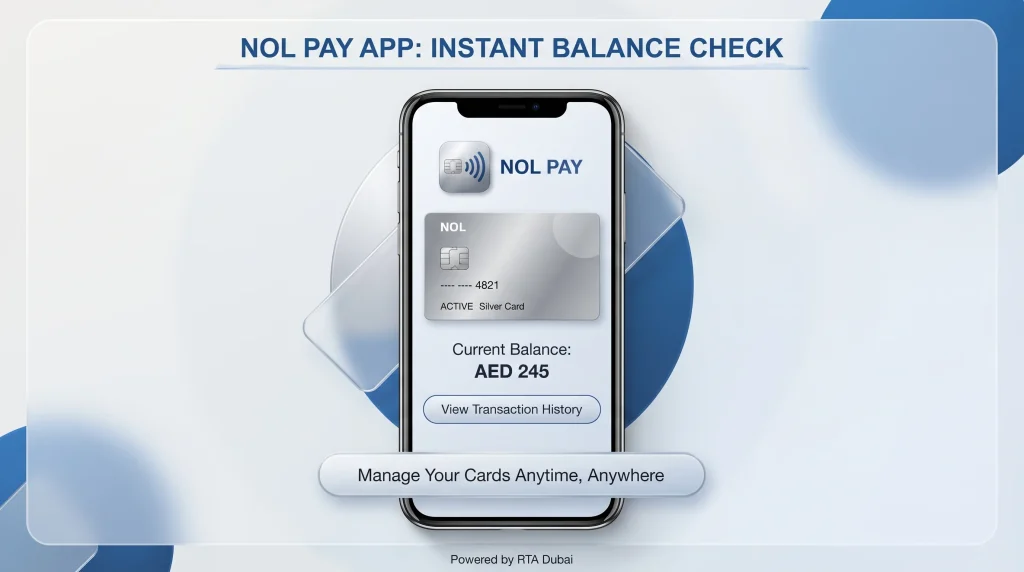
The NOL Pay app is RTA’s dedicated mobile application for managing NOL cards and is generally the fastest option for a NOL card balance check app experience, especially for NFC-enabled phones.
- Download NOL Pay from the App Store, Google Play, or Huawei AppGallery.
- Open the app and either continue as a guest or register using your UAE mobile number and email.
- Add your existing card using its Tag ID, or tap your physical card against the back of your NFC-enabled phone to scan it directly.
- Go to “My Account,” then “My Cards,” and select your card to view the balance.
- The screen shows your available balance, any pending top-up, and the expiry date.
The RTA Dubai app (the broader transport app that also covers journey planning, fares, and fines) includes a similar NOL balance section under “My Account,” so if you already have that app installed for metro timings or route planning, you do not need to install NOL Pay separately.
Advantages of Checking NOL Card Balance in Mobile Apps
- Real-time balance and recent transaction history in one view
- Low-balance alerts, so you are notified before your card drops under AED 7.50
- Ability to top up instantly from the same screen without visiting a station
- Management of multiple NOL cards under a single account, useful for families
How to Check NOL Card Balance via SMS
If you have no internet access, the SMS method works from any basic mobile phone.
- Open your messaging app and register your card by sending your 10-digit NOL Tag ID as a message to 511.
- Once RTA confirms registration by SMS, send “Balance” or “Bal” to 511 for future checks.
- You will receive a reply text showing your current balance.
This method is particularly useful for elderly commuters, first-time visitors without a local data plan, or anyone in an area with weak Wi-Fi or mobile data coverage near a station.
How to Check NOL Card Balance at Metro Stations and Kiosks
Every Dubai Metro station, tram stop, and major bus terminal has self-service ticket vending machines that display your balance instantly.
- Locate the ticket vending or top-up machine at any station.
- Place your NOL card on the designated reader or insert it into the slot, depending on the machine model.
- The screen will show your current balance and card expiry date within seconds.
- If your balance is low, you can top up immediately at the same machine using cash or card.
This is arguably the most reliable offline method because it pulls directly from RTA’s live system rather than a cached balance, and it doubles as a recharge point if you need to add credit before boarding.
Balance Display at the Gate
Every time you tap your card at a metro gate or bus validator, the reader briefly flashes your remaining balance after the fare is deducted. It is not a dedicated balance-check tool since it requires a completed tap, but it does give you a passive, automatic update on every single trip.
Checking Your NOL Card Balance History and Transactions
Beyond the current balance, RTA lets you review a NOL card balance check history so you can track spending over time.
- Via the RTA website: Enter your Tag ID under the transaction history section to view a log of recent trips, top-ups, and refunds by date.
- Via NOL Pay or RTA Dubai app: Navigate to My Account, then My Cards, then Transaction History, and filter by date range.
- At a customer service center: Staff can print a transaction summary if you need a physical copy for expense tracking or reimbursement.
Transaction history typically shows the time and location of each tap, the fare deducted, and any top-up amounts, which is useful for commuters managing a monthly transport budget or for employers reimbursing staff travel costs.
Comparison of All NOL Balance Check Methods
| Method | Internet Required | Speed | Best For |
| RTA official website | Yes | Fast, under 10 seconds | Home checks, full details including expiry |
| NOL Pay / RTA Dubai app | Yes | Very fast | Daily commuters, alerts, transaction history |
| SMS to 511 | No | Fast | No-data situations, seniors, tourists |
| Metro or bus station kiosk | No | Instant | On-the-go checks plus immediate top-up |
| Retail outlets and customer centers | No | Medium | Those needing human assistance or a printed receipt |
| Gate tap display | No | Instant, passive | A quick glance during your normal commute |
What Happens If Your NOL Card Balance Is Too Low
Unlike a bank card, a NOL card has no overdraft. Here is exactly what to expect if you try to travel below the minimum:
- At a Metro gate: The turnstile simply will not open. You will need to step aside and top up before trying again.
- On a bus: The card reader beeps and denies boarding immediately, with no partial fare allowed.
- At a parking meter: The transaction is declined outright, and you will need an alternate payment method or a topped-up card.
There is no fine for having a low balance itself, but repeated failed taps and delayed boarding can be a real hassle during peak commuting hours. The safest habit is to run a quick balance check the evening before an important trip, not while you are already standing at the gate.
How to Top Up After Checking Your Balance
Once you know your balance is low, RTA gives you the same channels for recharging as for checking:
- RTA website or NOL Pay app: Enter your Tag ID, choose a top-up amount, and pay by debit or credit card. Note that online top-ups may show as “pending” until activated at a gate, machine, or parking meter.
- Metro and tram station kiosks: Insert cash or card directly at the machine for an instant, fully activated top-up.
- Retail partners and customer happiness centers: Staff-assisted recharge, useful if your card is damaged or not scanning correctly.
If you also manage other UAE household payments digitally, it is worth bookmarking a few related services alongside your NOL top-up routine, such as an Etisalat Quick Pay recharge for mobile credit, or an FAB balance check if you bank with First Abu Dhabi Bank and want to confirm funds before an online top-up.
Troubleshooting: When Your NOL Card Balance Check Fails
- “Invalid Tag ID” error: Double-check you are entering all 10 digits exactly as printed, with no spaces. A worn or scratched card back can make certain digits hard to read.
- Balance not updating after a top-up: Recharges made online or through the app can take up to a few hours to activate. Tap your card at any gate, top-up machine, or parking meter to trigger activation.
- Card not scanning at a kiosk: This can indicate a demagnetized or physically damaged card. Visit an RTA Customer Happiness Center for a free condition check and, if needed, a replacement with your balance transferred (registered cards only).
- SMS balance check not working: Confirm your mobile number is correctly registered to that specific Tag ID; unregistered numbers will not receive a reply.
- App shows outdated balance: The displayed balance may exclude transactions from the past 24 to 48 hours in some cases. For the most current figure, check at a station kiosk or through the gate tap.
NOL Card Balance Check for Tourists and Visitors
Visitors to Dubai do not need an Emirates ID to use most NOL card balance check methods. A Silver NOL card, the most common option for short stays, can be checked online with just the Tag ID, at any station kiosk, or through the NOL Pay app as a guest user. This makes it easy to monitor spending during a trip without setting up a full RTA account. If you are combining public transport with other parts of your Dubai itinerary, our broader Dubai travel and city guides cover additional practical logistics worth knowing before you arrive.

Frequently Asked Questions
How do I check my NOL card balance online?
Visit the official RTA website, find the “Check NOL Balance” section, enter your 10-digit NOL Tag ID from the back of your card, and submit. Your balance, pending credit, and expiry date appear instantly with no login required.
How can I check my NOL card balance with just the number?
Your NOL Tag ID alone is enough for a balance check on the RTA website, in the NOL Pay app, or via SMS to 511. You do not need to provide your Emirates ID or any banking details for a standard balance inquiry.
How do I check my NOL card balance in mobile apps?
Install the NOL Pay app or the RTA Dubai app, register or continue as a guest, add your card using the Tag ID or an NFC tap, then go to My Account and My Cards to view the current balance and recent transactions.
Can I check my NOL card balance without the internet?
Yes. Send your NOL Tag ID by SMS to 511 to register, then send “Bal” for future balance checks. Metro and bus station kiosks also display your balance without needing an internet connection.
What is the minimum balance needed to travel?
AED 7.50 is required for standard Metro, bus, tram, and water bus trips. Gold Class cabins typically require a higher minimum, generally around AED 15.00, because of the premium fare.
Why does my balance show as pending after a top-up?
Top-ups made online or through the app are not always instantly active. The pending amount is confirmed but needs to be activated by tapping your card at a metro gate, top-up machine, or parking meter, which can take a few minutes to several hours.
Can I see my NOL card balance check history?
Yes. Enter your Tag ID on the RTA website’s transaction history section, or check My Cards, then Transaction History inside the NOL Pay or RTA Dubai app, to view past trips, top-ups, and refunds.
What happens if my NOL card balance is too low to travel?
The metro gate will not open and the bus reader will deny boarding. There is no overdraft or partial-fare option, so you must top up before attempting to travel again.
Is it safe to use third-party websites for a NOL card balance check?
For accuracy and security, RTA recommends using its official website, the NOL Pay app, or the RTA Dubai app. Avoid entering your Tag ID or personal details on unofficial sites that are not affiliated with RTA.
Final Thoughts
A NOL card balance check only takes a few seconds, but it is one of the most useful habits for anyone commuting through Dubai’s Metro, bus, or tram network. Whether you prefer the RTA website, the NOL Pay app, a quick SMS to 511, or a station kiosk, every official method pulls from the same live RTA system, so pick whichever fits your situation best. Keep a buffer above the AED 7.50 minimum, top up before you actually need to travel, and you will rarely think twice about your balance again.
For more practical UAE finance and daily-life guides, browse our Finance section, including our Hafilat balance check guide for Abu Dhabi bus card users and our NBAD balance inquiry guide for FAB and Ratibi card holders.